


Policies and Procedures
Accidents and Emergencies
Accident: First Aid Procedures
There are numerous types of accidents and injuries that can happen in and around the pool. It is important that the Watersafe Staff are able to recognize the accident, react appropriately, and complete the correct report.
Minor First Aid
A minor accident may include a child or parent needing a bandage, ice pack, or antiseptic wipe for a small cut, scrape, or bruise. In this instance, the bandage, ice pack, or antiseptic should be given to the client but NOT administered. They must apply these items themselves. For Minor First Aid needs, the cause of the injury should be determined and should be logged on the First Aid List. The employee should inform their immediate supervisor of the hazard.
Major Injuries
Please follow the steps detailed in the Emergency Action Plan (EAP).
Administrative Procedures
Balance Due Procedure
Call-Out Phones
Each location has a call-out phone at the front desk.
Los Alamitos: (562) 386-1750
Long Beach: (562) 547-0125
- Phones must remain at the front desk with the ringer on.
- At the start of each shift, the Office On-site Lead checks the phone for call-outs and send an
acknowledgment text.
If the Admin OSL is out for the day, the order of responsibility is:
Admin OSL → Admin OSL at same location → Admin OSL at the opposite location → Office
Manager → Pool Manager → Office Director → Pool Director
- If managers and Admin OSLs are unavailable, Office Staff will monitor the phone. In that case,
staff reply with:
“Thank you for letting us know. Your message is being relayed and someone from Leadership
will be in contact with you shortly.”
Standard Procedure (Weekdays)
When a Call-Out Occurs, the Admin OSL should,
- Acknowledge: Respond via text and confirm receipt.
- Announce: Post details in Leadership GroupMe (who, when, location).
- Find Coverage:
- Post the schedule needing coverage in the O-Fish-Al Family GroupMe.
- Use floater shifts if available.
- Move students into open spots (do not cancel scheduled makeups with other
instructors in order to accommodate a move over). - Reference the Instructor Schedule Doc and contact available subs directly from the
call-out phone. - Ask instructors already working to start earlier or stay later.
- Update Google Calendar: Add the call-out to Google Calendar and update as coverage is
found. - Notify Managers: If a specific schedule has multiple absences in the same month, inform
managers.
If No Coverage is Found:
Cancel lessons with at least 2 hours’ notice.
- The Admin OSL should call clients first, then text if no answer.
- Offer rescheduling during the call; if this is an exceptional situation (multiple absences on the
same schedule, etc.) credits may be offered if needed.
Call-Outs and Pending Schedules After 6pm (for next day):
- Add the absent shift to Google Calendar.
- Move students into open spots when possible for the entire schedule.
- If the uncovered schedule begins in the 8am hour, cancel the first 1.5 hours of classes (until
9:30am) - Post update in Leadership chat and tag: Opening Admin OSL, Call-Center OSL II, and Pool
Manager for the location.
Weekend Procedure (Saturday & Sunday Schedules):
Friday closing Admin OSL & Saturday Admin OSL closers handle the following:
- Move any students that can be moved for the entire next day’s uncovered schedule.
- Call and cancel all students left on a pending schedule/call-outs after 6pm for the following
day. On Saturdays, this should begin in the last 2 hours of the shift that the Admin OSL is
present for. - Post update in Leadership chat and tag: Opening Admin OSL and Aquatics OSL II.
- Ensure Google Calendar reflects all updates for the Saturday and Sunday schedule.
All call-outs must be resolved before the end of your Admin OSL shift.
Pro-Shop Operations and Inventory Control
locations and links
on-site storage unit West shed at the back of the property online, location based inventory jackrabbitclass.com in the store section on-site storage inventory swimwatersafe@gmail.com Google Sheets Pro-Shop pending orders/vendors/ordering swimwatersafe@gmail.com Googles Sheets
location based inventory
• location based inventory kept in the Jackrabbit software store feature
• item# is the designated location (LA or SB) and not the SKU (exception made for Vorgee goggles – see popsicles, water bottles, coffee, Vorgee goggles section below) • item cost, price, and inventory alert# are set by the CEO based upon storage space (coordinate with Office Manager)
• category 1 is set by location (Los Al Merchandise or SB Merchandise) • product name should be clear and easily identifiable to Front Desk staff • transaction type is set as Merchandise (Debit)
• track quantity on hand is set to “yes” and quantity on-site is listed
• tax rate is only set for items that are bought wholesale
• Front Desk staff conduct a hard inventory or all merchandise in December and June • inventory numbers updated in the Jackrabbit store
• discrepancies reported to the Office Manager
• Office Manager and CEO discuss discrepancies
• shelves should be stocked daily
• on-site merchandise storage should be organized, labeled, and allow room for enough on-site inventory to routinely stock the shelves
• any day-to-day discrepancies in hard, on-site inventory and the Jackrabbit store inventory should be corrected immediately and reported to the Office Manager
replenishing of onsite inventory (done by the CEO)
• on-site inventory is replenished weekly using off-site storage stock with the exception of popsicles, water bottles, and Vorgee goggles (see popsicles, water bottles, coffee, Vorgee goggles section below)
• weekly, inventory alerts from Jackrabbit store are checked
• product is retrieved from off-site storage and delivered to each location Watersafe Swim School – 345 10th Street, Seal Beach, CA 90740 – 562-596-8608
• off-site storage inventory is updated in the Google Doc
• on-site inventory is updated in the Jackrabbit store
• care should be taken to avoid delivering more product to each location than can be stored (coordination with Office Manager may be required)
off-site storage inventory
• off-site storage inventory kept in a Google doc in the swimwatersafe account • CEO conducts a hard inventory of off-site storage in December and June • Google doc inventory updated
• off-site storage inventory should be organized, easily accessible, and safely stored product re-ordering
• off-site storage inventory in the Google Doc details current inventory and inventory alerts (set by the CEO)
• Google doc is monitored weekly to determine any inventory alerts at storage unit • individual product ordering processes are listed in the Google doc
• quantity of product is to be ordered based upon delivery times, storage space, and sales
• product is delivered to the Los Alamitos location and placed in the designated location away from customers (and is not inventoried by the Front Desk)
• CEO inventories product into Google Doc and delivers product to storage unit during weekly location replenishment runs
shop fixtures
• Office Manager and CEO determine shop fixture ordering based upon facility size, product display needs, and the condition of the existing fixtures
• fixtures may be ordered by the CEO or the Office Manager
product display
• Office Manager and CEO determine method of product display based upon facility size, product size, and sales
• Office Manager and CEO communicate social media promotion needs to the social media coordinator
new product
• Office Manager, CEO, owner, and directors approve new product
• new product research conducted by CEO and Office Manager with suggestions taken from staff and customers
Watersafe Swim School – 345 10th Street, Seal Beach, CA 90740 – 562-596-8608
• new product pricing, ordering, and promotion are coordinated by the Office Manager and CEO
sales report analysis
• monthly sales detail reports are generated by the CEO and included in the monthly financial report
• quarterly, the CEO and Office Manager analyze individual product sales to determine necessary changes in price, displays, promotions, sales, and products offered
sales, discounts, and specials
• sales are determined by the Office and CEO with suggestions taken from directors and managers
• sales, discounts, and specials may be:
• seasonal
• set to move slow selling product
• set to eliminate product
• set for agreed upon loss leaders
sales tax
• sales tax rates are based upon the Seal Beach, CA sales tax and only applied to items bought wholesale
• CEO pays quarterly sales tax through the Tax and Fee Administration website popsicles, water bottles, coffee, and Vorgee goggles
• popsicle type/quantity ordering is determined by the Front Desk staff and communicated as needed, to the CEO for order placement
• water bottle ordering is communicated to the CEO by the Front Desk staff • coffee and supplies are ordered by the Office Manager
• Vorgee goggle
• Vorgee ordering is determined by Vorgee and approved by the CEO
• Vorgee orders are delivered to the location
• CEO communicates quantities to the Office Manager
• Office Manager inputs inventory into Jackrabbit store and places inventory in on-site storage
• Vorgee item numbers are the item SKU with the first letter of L (Los
Alamitos) or S (Seal Beach) added to the front of the SKU in the item #
category in Jackrabbit
Watersafe Swim School – 345 10th Street, Seal Beach, CA 90740 – 562-596-8608
• all other Jackrabbit product detail instructions are the same as all other product with the addition of adding “Vorgee” as the vendor and adding the vendor item #
promotional items
• from time to time, promotional items such as stickers, toys, pops, inflatable rings, and seasonal specialities are ordered. These are one-time orders placed by the CEO or Office Manager
• promotional items should be input in the Jackrabbit store the same as all other items and inventoried
Full Version
Watersafe Swim School Registration Fee Policy & Re Enrollment Procedure
Effective Date: 3/1/26
Purpose
This policy establishes an registration fee structure designed to simplify billing, reduce re enrollment penalties, and provide flexibility to families while protecting Watersafe Swim School’s administrative costs.
1. Registration Fee Structure
Standard Enrollment Fee
• A $100 registration fee per family is charged at the time of initial enrollment. • The registration fee is valid for 12 months from the date it is charged.
• The registration fee supports a wide range of benefits for your family, including flexible scheduling and makeup lessons, progress ribbons, certificates, and medals, access to programs like All-You-Can Swim, use of our app, and participation in events such as Achievement Meets and Pre-Competitive Swim Meets. It also helps fund ongoing facility enhancements, safety improvements, and year-round training for our instructors to ensure high-quality teaching and customer service.
Non-Refundable Policy
• The registration fee is non-refundable, regardless of attendance, schedule changes, or early withdrawal.
• The registration fee has no cash value and may not be transferred to another family. 2. Re-Enrollment Policy Within 12 Months
Watersafe Swim School, EST. 1977
If a family drops lessons and re-enrolls within 12 months of their original registration fee payment:
• No additional enrollment fee will be charged
• The family may resume lessons without penalty
• The original registration fee remains valid until the 12-month expiration date This provides flexibility while maintaining fairness for returning families.
3. Re-Enrollment Policy After 12 Months
If a family drops lessons and re-enrolls more than 12 months after their last registration fee payment:
• A new $100 registration fee will be charged
• A new 12-month enrollment period begins on the date of payment
4. Families Who Maintain Continuous Enrollment
If a family remains continuously enrolled without dropping lessons:
• No additional regisrtation or re-enrollment fees will ever be charged • Enrollment remains active without interruption
5. Staff Procedure for Re-Enrollment Review When re-enrolling a returning family, administrative staff must:
Step 1 — Locate Registration Fee Record
• Review the family’s account history
• Identify the most recent registration fee charge date
Step 2 — Determine 12-Month Status
• If less than 12 months have passed since the enrollment fee charge: Watersafe Swim School, EST. 1977
◦ ✅ Do NOT charge a new registration fee
• If 12 months or more have passed:
◦ ✅ Charge a new $100 enrollment fee
6. Special Cases & Exceptions
Watersafe Swim School reserves the right to waive or apply registration fees at its discretion in cases including but not limited to:
• Medical hardship
• Facility closures
• Military relocation
• Administrative error
• Promotional offers
• Manager approved cases
All exceptions must be approved by a Manager or Director and documented in the account.
7. Customer Disclosure Language (Legal-Safe)
Registration Fee Policy Summary
A $100 registration fee per family is valid for 12 months from the date of payment. Families who withdraw and re-enroll within 12 months will not be charged an additional registration fee. If enrollment resumes after 12 months, a new registration fee will apply. Registration fees are non refundable. Watersafe Swim School reserves the right to modify or discontinue this policy at any time.
8. Compliance & Legal Protections
Watersafe Swim School reserves the right to:
• Modify fees with advance notice
Watersafe Swim School, EST. 1977
• Correct billing errors
• Deny service in cases of fraud or misuse
• Interpret policy terms in good faith to ensure fairness and consistency
Employee Quick Access Version Watersafe Swim School, EST. 1977
Watersafe Swim School — Registration Fee (Front Desk Quick Access)
Enrollment Fee: $100 per family
Valid For: 12 months from payment date
Goal: Allow families to drop & re-enroll within 12 months with no penalty
✅ When to Charge the $100 Registration Fee Charge $100 IF:
• Family is brand new
• Family is re-enrolling AND 12+ months have passed since last registration fee DO NOT Charge $100 IF:
• Family is re-enrolling within 12 months of last registration fee • Family has never dropped enrollment (continuous lessons)
12-Month Rule (Quick Check)
When re-enrolling a returning family:
Step 1 — Find Last Registration Fee
• Open the family’s account
• Locate the most recent registration fee charge date
Step 2 — Compare Dates
• Less than 12 months ago? → ❌ Do NOT charge fee
• 12 months or more ago? → ✅ Charge $100 registration fee
Watersafe Swim School, EST. 1977
Suggested Script for Families
If NO fee applies:
“Good news — your registration fee is still active, so there’s no re-enrollment charge.” If fee DOES apply:
“Your registration fee covers a 12-month period. Since it has been over a year, a new $100 registration fee applies.”
Important Rules
• Registration fee is non-refundable
• Fee is per family, not per child
• Fee cannot be credited, refunded, or transferred
• If unsure — pause and escalate to Manager or Director
Escalate to Manager If:
• Parent disputes fee timing
• Account history is unclear
• Special hardship or exception request
• Possible prior billing error
Front Desk Goal
Be kind, confident, and consistent
This policy helps families enjoy flexibility without surprise re-enrollment penalties Watersafe Swim School, EST. 1977
Staff Scripted Answers
Watersafe Swim School — Registration Fee Staff Script
Tone Goal
Watersafe Swim School, EST. 1977
Warm • Confident • Helpful • Never defensive
Frame the policy as a benefit and flexibility, not a penalty.
When NO Registration Fee Applies
(Re-enrolling within 12 months)
“Good news — your registration fee is still active, so there’s no re-enrollment charge. You’re all set!”
“Since you’re returning within 12 months, you can jump back into lessons with no extra fee.”
When a NEW Registration Fee DOES Apply (12+ months since last registration fee)
“Our registration fee covers a 12-month window, so families can drop and return anytime during that year with no penalty. Since it’s been over 12 months, a new $100 registration fee applies, and that resets your 12-month coverage.”
“This fee helps cover registration, scheduling, and ongoing account support. Once it’s paid, you won’t need to pay another registration fee unless there’s a break longer than a year.”
If a Parent Pushes Back or Feels Surprised Acknowledge + Reassure
“I totally understand — no one likes unexpected fees. The upside is that once this is paid, you’re covered for a full year, even if you need to pause and return.”
“We designed this policy to remove re-enrollment penalties and give families more flexibility.” Watersafe Swim School, EST. 1977
If They’ve Been Continuously Enrolled
“Because you’ve stayed continuously enrolled, you’ll never need to pay a re-enrollment fee. We really appreciate your commitment to lessons.”
If They’re Emotional or Hesitant
Empathy first
“We love having your family here, and we want to make this as smooth as possible. If you’d like, I can check with a manager to see if there are any options.”
When to Escalate Gracefully
“Let me grab my manager so we can make sure we’re giving you the best possible support.”
Closing Line
“We’re so glad to have your family as part of Watersafe”
Practices Version for the Website
Registration Fee: Our $100 per-family registration fee is valid for 12 months, giving families flexibility to pause and return without penalty during that time. If a family pauses lessons and re enrolls after 12 months, a new registration fee will apply.
Damaged Pro-Shop Items
If a pro-shop item or its packaging becomes damaged and can no longer be properly displayed
(e.g., torn, stained, crushed), the item should be placed in the designated Damaged Item Bin at
your location.
The Pro-Shop Coordinator will review each damaged item and determine the appropriate next
step, which may include:
- Returning the item to the vendor
- Adding it to the pool teaching supply inventory
- Selling it at a discounted price
- Discarding the item
Aquatics Procedures
Watersafe Teaching Floater Shifts (Los Alamitos)
Description: pre-assigned hours as a substitute or make-up teacher
Location: Los Alamitos only
Compensation: additional $5/hr
Hours:
May – October
M-F 8:00 am – 8:00 pm; Sat 8:00 am – 5:00 pm; Sun 8:00 am – 2:00 pm
November – February
M-F 2:00 pm – 8:00 pm; Sat 8:00 am – 5:00 pm; Sun 8:00 am – 2:00 pm
Shifts: Shifts will be made available on Friday at 9:00 pm on payday for the following 2 weeks; teachers will be able to sign up in 1-hour blocks for these additional, guaranteed hours through a link provided in the O-Fish-Al Watersafe Family Group Me
Rules
- You may sign up for as many or as little hours as you wish
- You may sign up as soon as the day before the shift is scheduled (no same day sign ups)
- You may cancel your shift no later than 24 hours before the start of the shift. You must post
in the O-Fish-Al family chat that you have dropped a floater shift - You may not cancel your shift the day of (the On-site Lead will have already assigned you
students at that point) - The decision to utilize your hours for substitute or make-up lessons is at the discretion of the
Office On-site Lead
GRADE UPDATE PROCEDURE
Timeline:
- Grade sheets will be sent out the third week of the month.
- They will be due back by the last week of the month.
Talking to Teachers:
- I will make an announcement via O-Fish-Al group chat in GroupMe informing instructors that
Grade Update emails will be sent out that day. - Follow up message will be sent out that Friday, reminding instructors that grade updates are
due that upcoming Monday. - I will be checking in with instructors that week that turned in their updates from the previous
month late/not at all. - After the due date, direct messages via GroupMe will be sent out to instructors who have not
responded to the grade update email. - Instructors will continue to be encouraged to update grades on the fly via the pool phones &
to pair updates with ribbons for the benefit of their students.
How to Update & Input:
- I will send out emails to instructors with their weekly schedules, directing them of the format on how to respond with their updates & it will also include the deadline of when they are expected to respond to the email by.
- Instructors can respond to the email with grade changes. If no changes, then they are directed to respond with “No Changes”.
- Instructors who chose to get a printed copy will be directed to take a screenshot of paper copy & send it to me via email(NOT TO TURN INTO OFFICE).
- I will then go into the system to update grades via SB concierge login
Consequences for Not Updating Grades:
- Mentors/Masters checking that grades are up to date when they are observing instructors. Substitutes communicating to OSL that the schedule they subbed for did not have up to dategrades, making sub shift more difficult.
- Instructors not making progress with students because their grades are not up to date, so they struggle with making a sufficient lesson plan based off incorrect grades & therefor their students suffer the consequences of stagnation. This can lead to parent complaints & turn over.
Happy Nappy & Diaper Check Policy
At Watersafe Swim School, we are committed to maintaining a safe, professional, and respectful
environment for all students. This policy outlines proper procedures regarding Happy Nappy use,
diaper checks, and student privacy.
- Required Swimwear
- All swimmers who are not fully potty trained and under the age of 4 must wear
a Happy Nappy and sacrificial swim diaper layer underneath at all times while in the
pool. - This double-layer system helps ensure water safety, hygiene, and compliance with our
health standards.
- Verbal Students
- Instructors may verbally check in with students using age-appropriate language, such as:
◦ “Do you need to use the bathroom before we swim?”
◦ “Did you already go potty?” - Instructors should never perform a physical check or adjustment of a student’s
swimwear.
- Nonverbal Students
- For nonverbal students, instructors may look for non-invasive signs that may suggest a
need for a diaper change, such as:
◦ Noticeable smell
◦ Facial expressions or visible discomfort
◦ Visible swelling or sagging in the diaper area - If these signs are observed, the instructor should escort the student to their parent or
guardian and ask the parent to perform the diaper check.
- Concerns About Proper Layering
- Staff are not permitted to physically confirm whether a sacrificial layer is being worn.
Watersafe Swim School, EST. 1977
Long Beach – Los Alamitos
1(855) WSS-SWIM watersafe.com - If an instructor suspects that a student may not be wearing the required double-layer, they
must check in with the parent and confirm they are wearing the Happy Nappy and
sacrificial layer policy. - All discussions should be handled privately and respectfully.
- Privacy and Safety
- Staff will never perform diaper checks on their own or without parent consent.
- This policy ensures the safety, consent, and dignity of every student and provides
protection for both our staff and the Water Safe Swim School community.
onboarding packet 2026
teacher schedule break accommodations
Manager/Director approved medical accommodations will be noted at the top of the
SwimWatersafe General Calendar and will include:
- The total duration of the accommodation
- Any specific instructions or details related to the accommodation.
Teachers without an approved medical accommodation may not request additional breaks from the Front Desk.
If a teacher feels unable to work at full capacity, they must speak directly with their On-Site Lead (OSL) or manager to discuss their situation.
call out procedure for adult lessons
- Instructor must contact the call out phone by 6pm the day before
- Once the instructor calls out, PM Office Onsite lead reaches out to find sub
(Text Christie, Daniel, or Ginny and post in LA Sub Group) - If no response by 7pm, lessons should be cancelled by the end of the night
- If sub is found, update Google calendar and post on the Leadership chat
- Credits will be given back to their accounts if cancelled
downtime priority list for adult group lessons
- Opening Duties (Set up both indoor and outdoor pool area)
- Organize indoor and outdoor bins
- Make sure ribbons drawer is stocked
- Work on free/back and dives/turns training pamphlet (Christie)
- Work on training videos for Talent (Daniel.)
- Ask management if anything needs to be done
Disciplinary Procedures
Watersafe Swim School may use warnings, verbal reprimands, written reprimands, suspensions, performance
improvement plans, demotions, removal of shifts, and terminations when addressing employee policy violations.
Please see the following list for the proper order of disciplinary actions.
Order of Disciplinary Action Per Policy Violation:
When an employee violates a company policy or procedure, discipline may be applied in the following order.
*EXCEPTIONS: Severe violations such as harassment, theft, violence, threats of violence, excessive policy
violations varying in nature, or employee intoxication may result in immediate termination or other actions outside
of the standard order of discipline. Tardiness discipline track varies from the standard track (see tardiness discipline).
First Offense: Warning
Second Offense: Verbal Reprimand
Third Offense: Written Reprimand
Fourth Offense: Performance Improvement Plan
Fifth Offense: Last and Final Warning
Sixth Offense: Suspension, Demotion, Removal of Shift, or Termination at discretion of management
Violations of separate Watersafe policies are NOT combined to result in increasing levels of discipline. For example, if a Watersafe employee violates, for the first time, the Attendance Policy as well as the Professionalism policy, the employee will receive two warnings, not a verbal reprimand.
Tardiness Discipline
All tardiness is to be reported, recorded, and addressed every time an employee is late for their scheduled shift. Tardiness is defined as being late to work with no designation of the length of time the employee is late. Discipline is to be applied using a “strike” system in which employees receive strikes before receiving an official warning, verbal reprimand, and written reprimand. Full time employees receive 2 strikes and part time employees
receive one strike before the aforementioned discipline is applied. Discipline also includes one week unpaid suspension after the last and final warning. Two unpaid suspensions periods will be applied before employee termination.
First Offense: strikes (FT = 2; PT = 1) followed by Warning
Second Offense: strikes (FT = 2; PT = 1) followed by Verbal Reprimand
Third Offense: strikes (FT = 2; PT = 1) followed by Written Reprimand
Fourth Offense: Performance Improvement Plan
Fifth Offense: Last and Final Warning
Sixth Offense: Unpaid Suspension (1 week)
Seventh Offense: Unpaid Suspension (1 week)
Eighth Offense: Demotion, or Removal of Shift or Termination at discretion of management
- discipline will continue to follow the standard reset period of 12 months after the warning
- trial period throughout 2025
- implementation is not retroactive
Discipline Reset
Discipline for any specific policy violation (i.e. Timekeeping and Attendance, Attitude and Professionalism,Performance, etc.) will reset 12 months after the initial warning. See Disciplinary Procedures for order of discipline.
Performance Improvement Plan (PIP)
An employee may be placed on a PIP for multiple violations of the same policy within a 12 month span. If an employee succeeds in completing the PIP, additional policy violations proceeding the completion of the PIP will result in a Last and Final Reprimand if the violation is within 12 months of the initial warning.
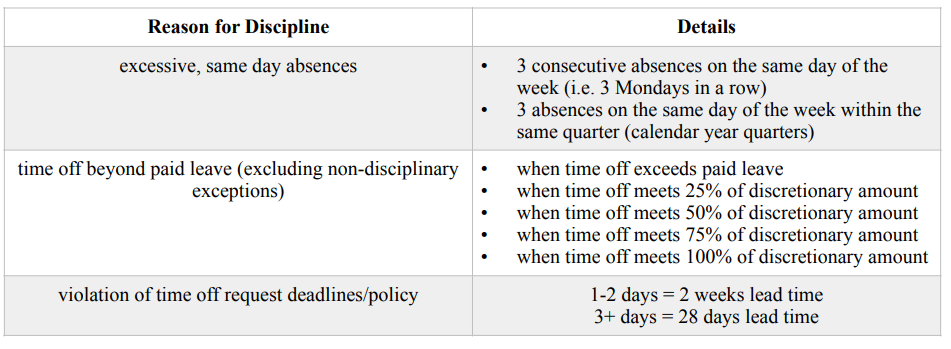
Excessive Absences
Excessive employee absences are defined as any employee absence not covered by paid leave or a qualifying unpaid absence including but not limited to bereavement, jury duty, FMLA, or other forms of exempt leave. Excessive absences are also defined as 3 consecutive absences on the same day of the week (ie 3 Mondays in a row) or 3 absences on the same day of the week within the same quarter (calendar year quarters). In the event of an unplanned employee absence, Paid Sick Leave will be applied first except in cases of bereavement, jury duty, FMLA, or other forms of exempt leave. When an employee utilizes the entirety of their allowable Paid Sick or Paid Vacation Leave, the remainder of paid leave from the other category will be used. When an employee is out of Paid Sick Leave and Paid Vacation Leave, additional absences will be considered as excessive absences and may be subject to discipline if the absences are not excused under a qualifying leave category including but not limited to bereavement, jury duty, FMLA, or other forms of exempt leave.
Discretionary, Unpaid Hours
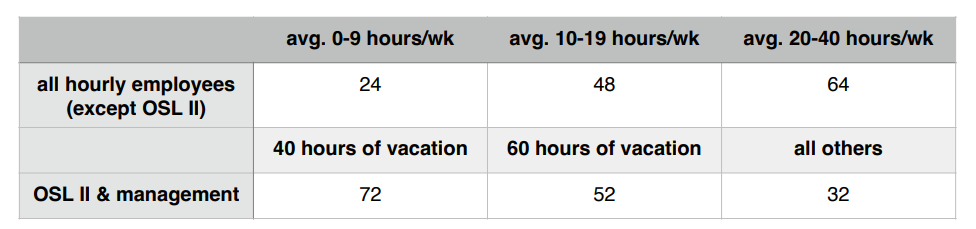
Discipline for excessive absences is at the discretion of Watersafe management. The table below displays the amount of discretionary hours for employees based upon the position, average amount of weekly hours worked, and/or the amount of paid vacation time allowed. Discipline may be applied when an employee’s absences enter into excessive absences (absences beyond paid time off). Additional discipline may be applied when an employee is absent for 25%, 50%, 75%, and 100% of the listed discretionary hours.
Managers reserve the right to deny requested time off at their discretion if the employee has utilized all PTO.
Reasons for denial may include: The maximum amount of employees who have requested time off for the specific shift has already been reached; approval may cause the employee to received additional discipline; the absence may
cause hinderances to student progress or lead to undue burden on co-workers.
*Note all Paid Time Off and discretionary hours reset on January 1st each year.
Discretionary Hours Table
Employees with excessive absences and other time-off policy violations will receive discipline in the following
manner:
Employee Meetings
Watersafe Swim School may hold optional and mandatory meetings. All mandatory meetings are paid time for employees. Mandatory meetings may be company-wide or department/team specific. If an employee is not able to attend a mandatory meeting, they must report their inability to attend the meeting to their direct manager before the meeting. The employee must follow the manager or department specific instructions to obtain the meeting information. If an employee misses more than two mandatory meetings without communicating their absence to their manager before the start of the meeting, they will be subject to the Watersafe discipline procedures.
family disputes and neutrality policy
General Policy
Watersafe employees shall remain neutral in all disputes involving parents, guardians, family
members, or other individuals associated with a student’s account.
Employees should not become involved in disagreements between family members and should avoid taking actions that could reasonably be interpreted as supporting one party over another.
Presumption of Equal Access
Unless Watersafe has received a valid court order or other legally binding legal document that limits a parent’s or legal guardian’s rights, Watersafe will presume that each parent or legal guardian has equal authority to access their child’s account and information as permitted by law.
Employees shall not deny a parent access to student information, attendance records, schedules, billing information, or other account services based solely on the request or representations of another parent or family member.
Likewise, employees shall not provide preferential treatment to one parent over another or attempt to determine which parent has greater legal authority. Any request to restrict a parent’s access or modify parental rights must be referred to management and supported by appropriate legal documentation.
Routine Account Administration
Watersafe will continue to conduct normal business operations in the ordinary course of serving our customers. Staff may process routine administrative requests that are unrelated to a family dispute, including but not limited to:
- Updating contact information.
- Updating payment methods.
- Processing enrollments, transfers, drops, and schedule changes.
- Adding or removing emergency contacts when requested by the account holder in
accordance with standard company procedures. - Making other routine administrative changes consistent with Watersafe policies.
However, if an employee becomes aware that a request is connected to a custody dispute, divorce, restraining order, or other family conflict, the employee shall stop processing the request and immediately refer the matter to management. No action that could affect a parent’s or guardian’s legal rights or access to information should be taken without management approval.
Staff May Not
Without approval from senior management and appropriate legal documentation, employees may
not:
Write letters, statements, affidavits, declarations, or other written communications
regarding a child’s attendance, progress, behaviors, parent interactions, observations, or
other matters for use in legal proceedings, custody disputes, divorce proceedings,
restraining order matters, or other personal disputes.
- Provide opinions regarding parenting ability, custody arrangements, visitation, or what is
in the child’s best interest. - Serve as witnesses or provide written documentation on behalf of one parent or family
member. - Remove a parent, guardian, or authorized contact from a student’s account because
another parent or family member requests it. - Restrict a parent’s access to student information or account privileges based solely on
another individual’s request. - Release internal records, security camera footage, attendance records, incident reports, or
other confidential information except through approved company procedures or as
required by law. - Allow themselves to become involved in conversations intended to gather support,
evidence, or opinions for an ongoing family or legal dispute.
Court Orders and Legal Documents
Watersafe will comply with valid court orders and other legally binding legal documents.
If a parent or guardian requests that Watersafe:
- Remove another individual from an account.
- Restrict access to student information.
- Modify account permissions because of a custody dispute.
- Restrict student pick-up privileges.
- Take any other action affecting parental rights or legal access.
The request must be referred to senior management. Management may require a certified court order or other legally sufficient documentation before any changes are made.
Employees should never interpret legal documents or determine whether a document is legally enforceable. All legal documents shall be forwarded to management for review.
Requests for Documentation
Parents or legal guardians may request copies of Watersafe records that are routinely maintained in the normal course of business, such as attendance records, invoices, receipts, or other standard business records, when permitted under company policy and applicable law.
Employees should not create new documentation, summaries, opinion letters, character references, or statements intended for use in legal proceedings or family disputes.
Staff Response
If asked to become involved in a family dispute, employees should respond professionally and consistently:
“I’m sorry, but Watersafe remains neutral in family and legal matters. I am not authorized to provide letters, opinions, or make account changes related to parental disputes. Any legal documentation or special requests must be reviewed by management.”
If the individual continues to press the issue, staff should politely end the discussion andimmediately refer the matter to management.
Management Responsibilities
Management will:
- Review all legal documents before any account changes are made.
- Consult legal counsel when appropriate.
- Ensure staff are protected from becoming involved in family disputes.
- Apply this policy consistently.
- Document significant requests involving custody, legal matters, or parental disputes.
Confidentiality
Employees shall maintain the confidentiality of all students and families. Information may only be shared with authorized individuals in accordance with company policy and applicable law.
Violations of this policy may result in disciplinary action.
gossip policy
What is gossip?
Gossip is when someone participates in a conversation or spreads personal/private information
that undermines another person. Gossip is not considered productive information and can lead to
others feeling harassed or discriminated against. This does not include conversations regarding
wages, hours, and working conditions.
What is the expectation?
At Watersafe Swim School, we encourage a culture of integrity that values respect for all staff
and patrons. These values should be displayed consistently in actions and words regardless of
who is present. Watersafe staff members should encourage inclusion, growth, and kindness.
When a staff member conducts themselves in a manner that does not reflect these values, they
may be subject to discipline.
What to do when you suspect gossip?
When you suspect that malicious, untrue, or private information is spreading in the workplace,
- Do not participate.
- Kindly remind those participating of Watersafe’s Foundational Principles of respect and
accountability. - Report any necessary information to a manager.
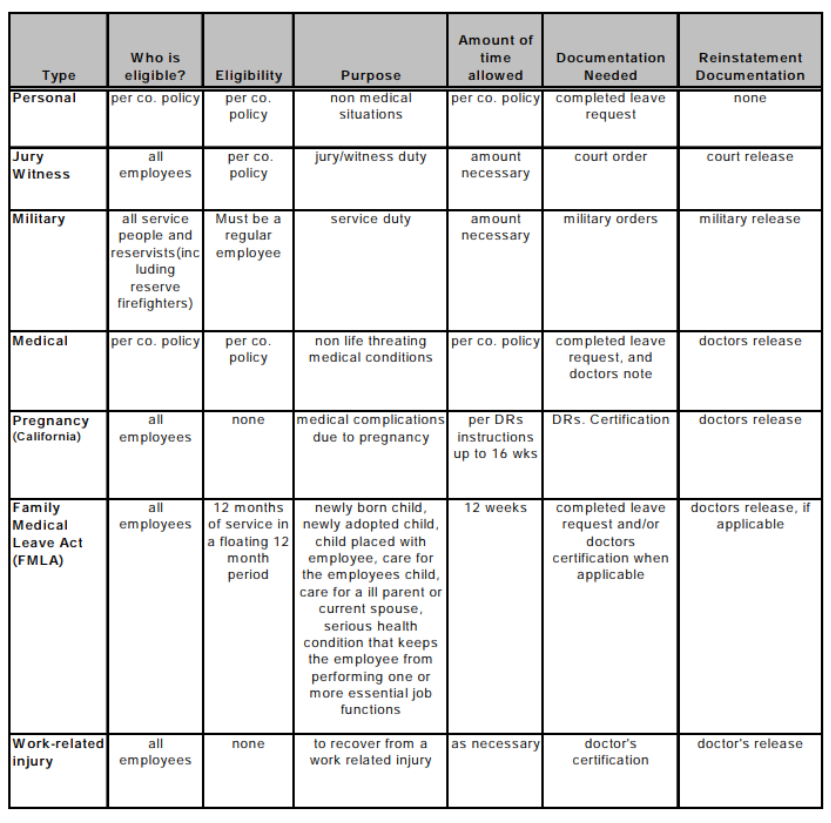
leave of absence procedure
What is a leave of absence?
A leave of absence may be defined as a period of time that an employee has been approved by management to be off of work without pay. Granting an employee a leave of absence is at the sole discretion of the employer unless required by federal and state laws.
Which laws govern leaves of absence?
If an employee notifies you of a leave of absence, please contact your CEO/COO immediately. There are several types of leaves and each type has its own set of regulations. The table on the next page shows the types of leaves and the regulations that are associated with them.
Who designates An Employee’s Leave for FMLA?
In all cases it is the employer who designates an employee’s leave as family leave.
Employee Responsibility
Employees are required to give you 30 days advanced notice for leave if the event is foreseeable (i.e., placement of a child, planned medical procedure). If the event is not foreseeable, employees must provide notice as soon as possible.
Get it in writing
In some cases a doctor’s note is required. The doctor’s note should contain information on the injury/ illness, if the employee can work with modified duties, and the approximate return date. A doctor’s certificate is required when a FMLA leave involves an injury/illness. It is acceptable for the doctor to use his/her own form if he/she prefers to. Employees on medical related leaves may not return until the doctor releases them in writing to either regular or modified duty.
Integration of hours
Employees may use their sick and vacation time along with disability insurance as long as the total of the two does not exceed what they would earn if the employee were working. In certain cases you can make it mandatory to use sick time.
Promotions Calendar
Location: swimwatersafe@gmail.com calendar
Title: promotions
Access: Anyone who has access to swimwatersafe gmail account. Specific purpose for directors, managers, admin. staff, events planner, achievement meet planner, social media coordinator.
Purpose: To display the timeline of the release of promotional materials, emails, and advertisements of Watersafe events and programs for the purposes of general knowledge, organization, and coordination/collaboration with other promotions.
Practices: Any Watersafe employee that is responsible for promoting Watersafe events and programs must use the promotions calendar to:
- Calendar the date, time, and location of their event (post the start date only for
ongoing programs such as Fast Track and JG prep). - Calendar the dates that promotional emails are to be sent and who will be
composing and sending the email. - Calendar the dates that flyers and banners are to be posted and/or distributed,
detailing where banners will be posted and how flyers will be distributed. - Calendar the dates that any other forms of promotions are scheduled to be
released such as Google and Social media ads as well as who will be creating
and posting the content.
Collaboration:
Clients should not be sent multiple promotions for different events within a 48 hour time period. Instead, the promotions should either be combined into a single communication or rescheduled at an earlier or later date. The best practice is to schedule all of the above promotions as soon as the dates of the event are confirmed to ensure proper timing and coordination.
re-hires
Watersafe Swim School may re-hire a former employee if, at the time of their original departure, they were deemed eligible for re-hire and left the company in good standing. Re-hires are subject to a single, re-hire interview with the department director. Returning employees are not guaranteed a position or hours at Watersafe Swim School. If a former employee is re-hired, the following conditions apply.
- Re-hires are not allowed to return to leadership positions.
- Re-hires may be offered their former position provided it is still available and their
original departure was less than one year from the date of re-hire. - If a re-hire’s departure date is longer than one year from the date of their re-hire, the
employee must begin their employment at entry level. - Re-hires should return at the pay rate that corresponds with their position and total
time with the company, including their former employment dates. Re-hires are not
guaranteed to return at their previous pay rate. - Eligibility for promotions and raises for re-hired employees is based upon the
employee’s time with the company beginning at their re-hire date.
recognition of legal authority
Watersafe recognizes legal authority—not personal claims.
Employees shall not make decisions regarding parental rights, custody, visitation, access to student information, account permissions, or student pick-up based solely on verbal statements, personal representations, text messages, emails, or documents that have not been reviewed and approved by management.
Statements such as:
- “I have sole custody.”
- “I’m the primary parent.”
- “The other parent is not allowed to have information.”
- “The judge told me…”
- “My attorney said…”
- “You need to remove the other parent from the account.”
Shall not, by themselves, result in any change to a student’s account or the services provided by
Watersafe.
Employees shall politely explain that Watersafe can only act upon valid legal documents that have been provided to and reviewed by management. Employees should never attempt to interpret custody agreements, divorce decrees, restraining orders, parenting plans, or other legal documents.
service animals policy
Although Watersafe Swim School has a strict no pets in the facility policy, in order to comply with the ADA we must allow service animals in the facility. Service animals are defined as animals that are individually trained to do work or perform tasks for people with disabilities. Dogs and miniature horses are the only two animals that the ADA and state of California recognize as service animals. Service animals in training are also allowed in the facility, and the same permissions apply. We cannot require any documentation or proof that the animal is a service animal. The service animal must be under the control of its handler, and must be harnessed, leashed, or tethered unless the individual’s disability prevents using such devices. If a client arrives with a dog or miniature horse to the facility in the hopes of entering, please ask them if the animal is in service and required for a disability. If the answer is yes, the animal (dog or miniature horse only) is permitted to enter the facility. We may only refuse entrance or ask for the animal to be removed from the facility if the animal is out of control and the handler does not take effective action, or if the animal is not housebroken.
student drop-off policy
Watersafe Swim School requires that all students under the age of 14 years old must be accompanied by a parent/caregiver over the age of 18 years old at all times while on the premises. Student drop-off is not allowed. The parent/caregiver must remain inside facility gates during the entirety of the student’s lesson or activity. Waiting outside of the facility or in a car is not allowed.
unpaid personal leave of absence policy
Policy
An unpaid personal leave of absence may be granted upon request to regular full- and part-time employees for important pressing personal needs, at the discretion of the department manager.
Provisions
- Individuals employed by Watersafe Swim School for a minimum of 90 days are eligible to apply for an unpaid personal leave of absence.
- Unpaid personal leave may only be requested after all other paid leave balances have been exhausted.
- Watersafe Swim School will attempt to hold an employee’s position open for the period of unpaid personal leave if such leave is 4 weeks or less. If leave is greater than 4 weeks, the employee, if qualified, will be entitled to the first reemployment opportunity available over the next six months.
- Employee health benefits will be continued in the same manner as received prior to the leave, if the leave is for 4 weeks or less. If an employee requests leave which will extend beyond the 4 week period, the employee will be advised of COBRA continuation rights.
- Unpaid personal leaves are limited to one per 5 year rolling period beginning the first day discretionary personal leave is taken.
- Accepting employment elsewhere is not a qualified reason for unpaid leave under this policy and may result in termination of employment at Watersafe Swim School.
- Partial unpaid leave resulting in a reduction of hours shall adhere to all listed provisions. Additionally, a reduction in weekly hours for a period greater than 4 weeks which leads to a change in the minimum hours required for the position/status (e.g., salary or full-time hourly employees) will result in a change in employment status until such time as the employee qualifies for the former status in compliance with the provisions listed here.
Procedure for applying for unpaid personal leave
Requests for unpaid personal leave must be made in writing to the employee’s direct manager using watersaferequest@gmail.com. One month’s notice is strongly recommended when requesting unpaid personal leave.
The manager shall review and act upon a request for unpaid personal leave in consideration of the following factors:
- The effect the leave will have on the ability of the department to carry out its responsibilities.
- The quality of the employee’s performance prior to the submission of the request. The minimum requirement for consideration of approval includes 12 months without a written reprimand and 6 months without a verbal reprimand. The employee must not be on an employee improvement plan.
All unpaid personal leaves must be approved by the manager, department director, and concurred with by the CEO and COO.
Procedure for returning from unpaid personal leave
An employee who has been granted an unpaid personal leave of absence shall give the manager reasonable notification of the intent to return to work at least two weeks prior to the return date.
Upon receiving notification of the employee’s availability, the manager will arrange to have the employee reinstated to the employee’s previous position/status/shift(s), if qualified. If the employee’s leave is longer than 4 weeks and the previous position/status/shift(s) are no longer available, the employee may be considered for other open positions/shift(s) which the employee is qualified for as they become available. If no position/shift(s) exist, the employee will remain on unpaid leave status until a suitable opening develops. If such openings do not occur
within a 60-day period, any obligation to reinstate the employee is discontinued and the employee’s leave status is changed to a voluntary termination of the positions or shift(s). Future reemployment would be as a rehire with only legally required reinstatement of applicable benefits.
Customer Illness Claim
When a parent believes their child has contracted an illness from the Watersafe pool or facility, the following investigation procedure must take place:
Employee receiving the report
- Give the guest your full attention when receiving the concern.
- Write down the details of the concern so that you can properly communicate the information to your manager. You do not need to ask follow up questions. A manager will take the time to investigate properly.
- Inform the guest that you are sorry to hear about the illness and that you will be reporting the incident to the manager who can properly address the concern. Assure them that we take these concerns seriously and that our cleaning and sanitation practices for the pool and the facility are anchored in maintaining a safe environment for all of our guests. Thank them for communicating the concern.
- Report the incident to your manager as soon as possible, conveying all of the information you received, using the Injury/Illness Report jotform.
Note: If the guest asks questions about other students, outbreaks, treatment, diagnosis, or any personal information of other guests or employees, inform the guest that the manager has access to this information and best answer their questions.
Manager receiving the report
- Contact the guest either in person or over the phone. DO NOT engage in text or emailconversations with a guest in this area.
- Give the guest your full attention, inform them that you are sorry to hear about theillness, and ask them for details of the illness including:
- When the guest last attended Watersafe.
- When the symptoms began.
- What the symptoms are.
- The name of the illness as diagnosed by a physician. If the guest hasnot visited the doctor, please inform them that the most helpful pieceof information in tracking illnesses is by a diagnosis from a physician. Inform them that if they do decide to visit a physician, we would appreciate the information if they are comfortable releasing it privately to Watersafe.
- Inform the guest that we do keep track of these types of incidents and take immediate action if there is evidence that additional health and safety protocol need to be implemented. Let them know that if they have additional information obtained after your interaction with them, they can contact you. If they email or text, please respond in person or via phone.
- Additional information that can be given to the guest:
- We exceed all health department standards for commercial pool sanitation andfiltration.
- We use liquid chlorine to sanitize our pools.•We use UV light to add an additional layer of sanitation.
- We sanitize our pools using an automated, chemical feed system to ensure thatour pools are always properly balanced.
- We manually check our pool chemical levels every 2-3 hours in addition to theautomated system.
- We sanitize our facilities using hydrogen peroxide in the “touch” areas for thesafety of the guests and we use bleach in the critical areas of the facilityincluding toilets and floors.
- We clean the most common touch areas of the facility every 30 minutes to 1hour and deep clean after closing.
- Log the details of the guest interaction on the Sick Swimmer Documentation.
- If the name of illness is unknown, check for trends on the illness log of similarsymptoms within 5-7 days of the current log entry. If a trend is observed, pleaseinform your Director immediately. You Director will take over the investigation.
- If the name of the illness is known, follow the procedure below:
- If the illness is a common, normally non-life threatening childhood or adultillness such influenza, common cold, hand/foot/mouth, chicken pox, measles,conjunctivitis (pink eye), etc. and there is a trend in the illness on the SickSwimmer Documentation within 5-7 days of the current log entry, pleaseinform the facility manager of the trend so that they can initiate a deep cleanand add cleaning rounds. Inform your Director of the trend.
- If the illness is a common, normally non-life threatening childhood or adultillness such influenza, common cold, hand/foot/mouth, chicken pox, measles,conjunctivitis (pink eye),etc. and there is not a trend in the illness on the SickSwimmer Documentation within 5-7 days of the current log entry, noadditional action is necessary.
- If the illness is a serious illness such as Giardia, Cryptosporidium, Hepatitis,or an illness of which you are not familiar, please report the incident to yourDirector immediately.
Note: If the guests ask if other guests have shown similar symptoms or illnesses,you may inform the guest that we do keep track of these types of incidents and take immediateaction if there is evidence that additional health and safety protocol need to be implemented. Thehealth and safety protocol may involve actions up to but not necessary including additional cleaning rounds, increased pool chemical checks, deep cleaning, alerting possible affectedguests, and working with the local health department to ensure safety.
Directors
- If a Director receives a report, an emergency Director meeting must be called to determine further actions.
employee re-hire eligibility
Former employees may be considered for rehire at the discretion of Watersafe Swim School.
Employees are not eligible for rehire under the following circumstances:
- The employee was involuntarily terminated by the company.
- The employee received five (5) or more disciplinary actions during the twelve (12)
months preceding their separation from employment. - The employee’s manager or director designated the employee as ineligible for rehire at
the time of separation.
Managers or directors who designate an employee as ineligible for rehire must document the
reason for the decision in the employee’s personnel record.
Eligibility for rehire does not guarantee re-employment. All former employees seeking reemployment must complete the standard application and hiring process and meet the qualifications and requirements of the position.
friends and family discount
Watersafe Swim School allows employees to extend discounted lessons to close friends and family members. To ensure all Watersafe families receive the full Watersafe experience and that operations run smoothly, the following guidelines must be followed.
Lesson Discounts
Active Watersafe employees may offer the following tuition discounts:
Immediate Family:
- 50% discount on monthly tuition
Extended Family & Friends:
- 25% discount on monthly tuition
Eligible classes include:
- Private Lessons
- Parent-Tot Classes
- Semi-Private Classes
- Group Classes
- Pre-Competitive Classes
The employee discount does not apply to:
- Registration fees
- Pro-Shop products
- Memberships or additional fees
- Fast Track programs
- Promotional or temporary events/classes
Employees may apply their discount to a maximum of five (5) active students at any time.
How to Apply the Discount
Employees must follow this process:
- Notify the Office Manager that you would like to apply a Friends & Family discount.
- Receive approval before the student registers.
- Have the family member or friend register online, by phone, or in person.
- If the student is already enrolled, notify the Office Manager so the discount can be applied to the account.
Free Friends & Family Lessons
Watersafe teachers may choose to offer free lessons to friends or family members, subject to
the following rules.
Limits
Teachers may teach up to five (5) swimmers at one time under this program.
Requirements
Free lessons must meet the following conditions:
- Lessons must take place before or after the teacher’s scheduled shift
- The teacher must not be on the clock during the lesson
- Lessons must be taught by a current Watersafe Swim School teacher
- Lessons may not take place on the teacher’s scheduled day off
- Lessons must occur during Watersafe operating hours
- Lessons must occur only when pool capacity allows
- If pool capacity changes, lesson times may need to be adjusted
- Teachers may not accept payment for these lessons
- Participation must be voluntary and agreed to by the teacher
Approval Process for Free Lessons
Before scheduling free lessons, employees must:
- Notify the Office Manager of the request.
- Provide the requested lesson time and teacher name.
- Wait for Office Manager approval before scheduling the lesson.
Once approved, the student will be added to the schedule and will receive the same policies, procedures, and customer experience provided to all Watersafe families.
Leave Without Pay – Subbing Policy (Proposal)
Watersafe recognizes that team members may occasionally wish to take time off without using accrued sick or vacation hours. To support flexibility while maintaining smooth operations, the following policy outlines how employees may request unpaid time off when full shift coverage is arranged in advance.
Eligibility & Request Process
- Employees must submit a Leave Without Pay Request to watersaferequest@gmail.com at least two (2) weeks in advance of the requested date(s) for 2 or fewer days and four (4) weeks in advance of the requested date(s) for
more that 2 request days. - Requests must include the name of the confirmed substitute for each affected shift. The confirmed substitute must be found before submitting the request.
- The employee is responsible for finding full coverage by a single person for each shift. Multiple-person coverage solutions will not be accepted.
Confirmation & Approval
- Once submitted, the employee’s Director (or Facility Manager) will review and confirm
the request. - Confirmation with both the employee and the substitute will occur via GroupMe, where the substitute must reply confirming they are taking the shift.
- Upon confirmation, the coverage will be added to the master calendar like all other shift coverages.
Rules & Limitations
- Approved Leave Without Pay requests are unpaid and considered excused absences and
will be recorded as such. - Employees may not request back-to-back absences on the same day of the week (e.g.,
two consecutive Fridays). - The Excessive Absence Policy remains in full effect and applies to all unpaid leave
requests. - Leave Without Pay is unpaid and does not affect existing sick leave or vacation accrual policies.
- There are no changes to the current sick leave payout or vacation rollover plans with the implementation of this policy and all discipline for excessive absences still applies (please see the Excessive Absence Policy for further details).
- Once an employee accepts a Leave Without Pay sub shift, it becomes their assigned shift. Calling out from this sub shift is treated the same as calling out from a regularly scheduled shift. All attendance rules and call-out policies apply.
Parent Reports Policy
Purpose
To strengthen communication between parents/guardians and teaching staff, Watersafe provides two channels for families to share important information about their child’s needs, learning preferences, or other details that may help their instructor provide the best possible experience.
Parent Communication Outlets
- Jackrabbit Registration Form
- During registration, parents have the opportunity to share details under the section
titled:
“What would you like your teacher to know about your child?” - This section appears immediately after the portion where parents list any
disabilities or special needs.
- During registration, parents have the opportunity to share details under the section
- Poolside QR Code Form
- Signs are posted poolside with the message:
“Have something you’d like your child’s teacher to know?” - Scanning the QR code opens a fillable and submittable JotForm, allowing parents to share new or updated information at any time.
- explanation on jot form
- these messages are monitored by management
- students name and lesson time
- teachers name
- What would you like your teacher to know?
- explanation on jot form
- Signs are posted poolside with the message:
Information Flow & Communication Process
A. Jackrabbit Registration Form Submissions
- Information entered by the parent is reviewed by the Front Desk during registration.
- The Front Desk emails the details to the Pool Managers and Head Coach through watersaferequest@gmail.com with the title “Parent Feedback”.
- The Pool Manager or Head Coach communicates the information directly to the assigned teacher via text or in person.
- The teacher confirms receipt of the message and may respond in one of three ways:
- “Understood” (no questions)
- “I have a question” (and lists the question(s))
- “Requesting a meeting” (with their Manager or Head Coach)
B. JotForm Submissions (via QR Code)
- JotForm responses are automatically sent to the Aquatics Director, Pool Managers and Head Coach.
- The Pool Manager or Head Coach shares the relevant information directly with the teacher (by text or in person).
- The teacher confirms receipt of the message and may respond with:
- “Understood” (no questions)
- “I have a question” (and lists the question(s))
- “Requesting a meeting” (with their Manager or Head Coach)
parent supervision policy
(Pool Deck Attendance Requirement)
To maintain a safe environment for every child, a supervising adult must remain on the pool deck during the entire lesson for all students under 14 years old. This requirement is part of our safety procedures and insurance regulations.
What is required
A parent or guardian must:
✔ Stay on the pool deck during the entire lesson
✔ Be ready to receive the student immediately after class ends
Parents may briefly:
- Use the restroom
- Speak with the front desk
What is NOT allowed
For safety reasons, parents may not:
✘ Leave the premises during the lesson
✘ Sit in their car
✘ Drop off and return later
During the lesson
- Students should receive a full lesson even if parents leave the pool deck
- Instructors cannot interrupt class time to locate parents
- If a parent leaves the premises, teachers/coaches should notify Guest Services/Front Desk
After the lesson
If a lesson ends and a parent is not present:
- If immediately available to the teacherGuest Services/Front Desk should be notified. The Pool OSL should be notified if Guest Services/Front Desk are not immediately available so that they may use the pool phone for notification and work out a temporary solution until the Front Desk arrives.
- Guest Services/Front Desk should hold the student at the Front Desk and attempt to contact the parent.
- The policy should be reviewed with the parent when they arrive.
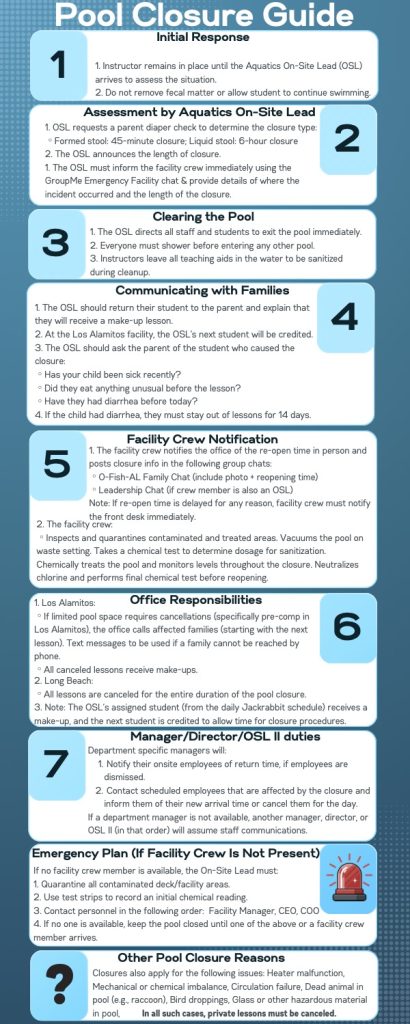
pool closure full procedure
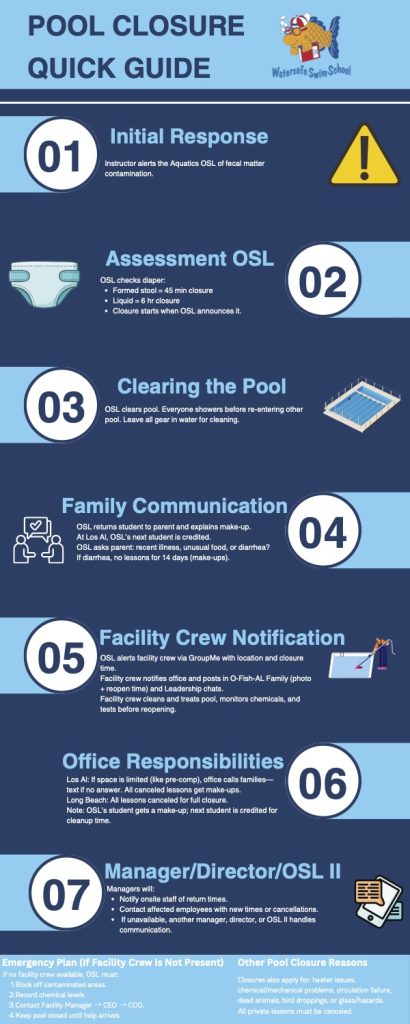
pool closure quickguide
practices for customers (English and Spanish)
Staff Visitor Policy
General Policy
Visitors of staff members are permitted and must follow all Watersafe guidelines while on the premises.
Visitor Check-In Procedure
When a visitor arrives asking to see a staff member:
- Visitor Must Wait at Front Desk
- All visitors must remain at the Front Desk upon arrival.
- Visitors are not permitted to walk through the facility unescorted.
- Staff Verification
- Front Desk staff will contact the employee to confirm:
- The visitor is known to them
- The visitor is approved to see them at work
- Front Desk staff will contact the employee to confirm:
If Visitor is NOT Approved
If the staff member does not recognize the visitor or does not wish to see them:
- Front Desk staff should say:
“We checked and we don’t have you as an approved visitor. We’ll need to ask you to leave.” - If the individual refuses to leave:
- Notify a manager immediately
- Contact local law enforcement for assistance
If Visitor IS Approved
- Time Limit
- Visits are limited to a maximum of 30 minutes
- Restricted Access
- Visitors are not permitted in employee-only areas for extended periods
- Access to back offices, staff rooms, or restricted areas should be limited and monitored
- Workplace Conduct
- Visitors must not interfere with or distract staff from their job responsibilities
- Staff members are expected to remain focused on their assigned duties
Staff Responsibility
- Employees are responsible for ensuring their visitors follow all Watersafe policies
- Any disruption to operations or guest experience may result in loss of visitor privileges
Front Desk Responsibility
- Enforce this policy consistently and professionally
- Prioritize safety, professionalism, and guest experience at all times
time-off protocol employees
Time-Off Approval Contacts
| Department | Approval |
| Administrative Staff | Shianna Wightman |
| Aquatics Staff | Liz Ford |
| Facility Staff | Irie Hines Singleton |
| Pool & Office Managers | Liz Ford, Shianna Wightman |
| Facility Managers | Nathanael Najarian, Meryl Cohn |
| Directors | Nathanael Najarian, Meryl Cohn |
Time-Off Request Deadlines
- Up to 2 consecutive days off: Submit at least 2 weeks in advance.
- 3 or more consecutive days off: Submit at least 1 month in advance.
Exceptions may be made for bereavement, immediate family emergencies, jury duty, and qualifying medical situations. All other requests submitted after the applicable deadline may be denied.
Time-Off Request Guidelines
All time-off requests must be submitted through the TriNet Employee Portal. Verbal requests
will not be accepted except in emergency situations.
- Time-off requests are evaluated based on business needs and may be denied for reasons
including, but not limited to:- ◦ Operational staffing needs.
- ◦ The employee’s attendance record.
- ◦ The length of the requested absence.
- ◦ Failure to meet the required submission deadline.
- ◦ The number of employees who have already been approved for the same day
- As a general staffing guideline, Watersafe typically approves no more than:
- 3 swim instructors at the Los Alamitos location per day.
- 2 swim instructors at the Long Beach location per day.
- 3 Administrative Team members per day total.
Management may approve exceptions when business needs allow.
- Teachers: Vacation requests must include current student progress and grade notes for substitute instructors. These notes should be emailed to swimwatersafe@gmail.com.
- A time-off request is not approved until the employee receives an approval notification through the TriNet platform.
- Leadership employees are responsible for ensuring their responsibilities are covered during their absence. This may include delegating duties to other team members or completing work before the leave begins.
Medical Leave of Absence
Requests for medical leave lasting more than seven (7) scheduled workdays may be considered a Leave of Absence and may require additional documentation and completion of applicable leave paperwork.
unpaid leave policy
Watersafe employees are allowed to request unpaid leave instead of using paid sick or paid vacation time. Employees requesting unpaid leave must follow the procedures below to ensure proper communication and coverage:
- Advance Notice
Requests for unpaid leave must be submitted within the same timeframe as standard vacation
requests and by emailing watersaferequest@gmail.com - Coverage Requirement
Employees are responsible for finding 100% coverage for each of their scheduled shifts.- Coverage must be provided by a single substitute per shift (no split or multiple-person coverage).
- The initial request must include the substitute’s name. The substitute must be found before submitting the request.
Note: An exception may be made when Onsite Leads are not able to find proper coverage due to management scheduling (E.g. when all other Onsite Leads are already scheduled to work on the requested day)
- Confirmation Process
After submission, the Director (or Manager, for facility staff) will review the request and confirm that all proper criteria have been met including confirmation with the listed substitute through a GroupMe message.- The substitute must reply in GroupMe to confirm they are taking the shift.
- Once confirmed, the shift will be approved and added to the official coverage calendar.
- Additional Requirements
- Employees may not take back-to-back unpaid leave on the same day of the week (for example, two consecutive Fridays).
- Unpaid leave requests must follow the same excessive absence rules currently in practice.
- Other Leave Policies
This policy does not affect current sick leave or vacation policies- Sick and vacation leave hours and policies remain unchanged.
- Job protected Leaves of Absence, bereavement, and jury duty are not subject to excessive absences and discipline.
Watersafe rewards and recogntion
Contagious Illness Policy
Policy Statement
Students or guests with a known or suspected contagious illness may not participate in swim lessons
or enter pool water until they are no longer infectious or medically cleared.
Do Not Swim If a Student Has:
Stomach Illness
- Diarrhea within the past 14 days
- Diagnosed GI infections (Crypto, Giardia, Salmonella)
Fever or General Illness
- Fever within the past 24 hours
- Flu-like or reportable illness
Contagious Skin Conditions
- Open or infected wounds
- Impetigo, ringworm (untreated), scabies
- Staph/MRSA
- Untreated head lice
Respiratory Illness
- Heavy coughing
- Sore throat with fever
Physician-Identified Contagious Disease
- Must wait until symptom-free or cleared by a doctor
Medical Clearance
A swimmer may return once symptoms resolve or with written physician confirmation that they do not pose a health risk. Caregivers are responsible for canceling lessons in accordance with illness guidelines.
Parent Responsibilities
- Monitor children for illness
- Keep sick children home
- Notify Watersafe of contagious diagnoses
Failure to comply may result in temporary suspension of swim privileges.
Staff Responsibilities
- Watch for signs of illness
- Report concerns to management immediately using the incident/illness report if the family states that the illness is contagious or might of been caused by the pool
- Remove swimmers respectfully and maintain confidentiality
Stroke School Try-out Procedure
Purpose
To evaluate new students interested in Advanced Stroke who are not entering through the Intro to Advanced Stroke program.
Scheduling
• Parents contact the office to request a Stroke School try-out.
• Office staff schedules the student into an available Level 1 Pre-Comp class. • Only one try-out can be scheduled into a class at a time.
• The student will be enrolled into the class as an eval lesson.
Arrival
• Student checks in with the front office.
• Office staff escorts the student to the pool deck and notifies the coach. Try-out
• Coach incorporates the student into the scheduled class and teaches as normal while evaluating their readiness.
• Additional drills may be used if needed.
• If the student is keeping up with the class, they may complete the full class as a complimentary trial.
• If it becomes clear the student is not ready, the coach may end the try-out early after a few laps to minimize frustration and discuss next steps with the parent.
Parent Discussion
• If ending the try-out early, ask the parent to walk alongside the deck while you continue supervising the class and briefly explain your recommendation. • If the student completes the full class, speak with the parent afterward to review the evaluation.
• Provide a recommendation for Stroke School placement or the most appropriate next step.
Follow-Up
• If approved, the office enrolls the student in the recommended Stroke School class. • If additional skill development is recommended, the office assists the family with the appropriate program placement.
** If none of these times work for the student, the Training Director should be alerted to schedule a try out time.
Available Try Out Times
Monday: 3:00 PM
• 5:30 PM
• 6:30 PM
Tuesday:
3:00 PM
• 3:30 PM
• 4:30 PM
• 6:30 PM
Wednesday:
4:00 PM
• 4:30 PM
• 6:30 PM
Thursday:
3:00 PM
• 4:30 PM
• 6:00 PM
Friday:
3:00 PM
• 4:30 PM
• 6:00 PM
Saturday:
10:00 AM
• 10:30 AM
• 2:00 PM
• 3:00 PM
• 4:30 PM
Sunday:
10:00 AM
• 11:00 AM
• 12:30 PM
Broken Glass Pool Closure Procedure
When to Initiate a Broken Glass Closure
A Broken Glass Pool Closure must be initiated whenever glass is confirmed to be in the pool. Broken glass may include:
• Glass that breaks while an object is in or over the pool.
• Glass that breaks on the pool deck and is definitively observed entering the pool. • Glass or a glass fragment that is discovered in the pool even though no glass-breaking incident was witnessed. This may include small pieces of glass that were inadvertently tracked into the pool from another location.
If glass is only suspected but has not been confirmed, immediately notify the OSL or manager and inspect the affected area to determine whether a glass hazard is present.
Broken Glass Closure Procedure
1. Close the pool for a minimum of 45 minutes.
The OSL will immediately announce a 45-minute pool closure.
All swimmers must exit the affected pool. No students, families, or other unauthorized persons may enter the pool during the closure.
2. Provide first aid when necessary.
If anyone has been injured by the glass, provide first aid according to Watersafe’s Emergency Action Plan (EAP).
Any injury or incident requiring documentation must also be reported according to Watersafe’s normal incident-reporting procedures.
3. Safely remove visible glass from the pool deck.
Inspect the area surrounding the pool for glass.
Carefully remove all visible pieces of glass from the pool deck and surrounding areas using appropriate protective equipment and tools.
Never pick up broken glass with bare hands.
Dispose of the glass in a manner that prevents employees, students, families, or other individuals from being cut by the discarded material.
4. Remove visible glass from the pool.
Carefully inspect the pool and remove all visible pieces of glass that can safely be retrieved. Staff should not enter the pool barefoot while glass may be present.
5. Continuously vacuum the pool.
Once visible glass has been removed, begin vacuuming the pool.
The pool must be continuously vacuumed for the remainder of the closure period up to the scheduled reopening time.
Vacuum the area where the glass was found or entered the water especially thoroughly. When the location or source of the glass is unknown, staff should vacuum the pool as thoroughly as reasonably possible rather than concentrating solely on one location.
6. Conduct a final inspection.
Before reopening, the OSL or designated manager must inspect the pool and surrounding deck. The pool should not reopen merely because 45 minutes have elapsed.
If additional glass is discovered, staff must remove it and continue the cleaning and inspection process. The pool must remain closed until the facility team is satisfied that the identified hazard has been corrected.
If staff cannot adequately remove the glass, cannot determine that the pool is safe for use, or believe additional glass may remain in the pool, do not reopen the pool. Escalate the situation to management for further action.
General All Staff
MISC
Employee Handbook
Foundational Principles
Mission
To build, in our swimmers, self-confidence, self-discipline, integrity, and courage for life in an atmosphere where excellence and champions are inevitable so that all students may progress to mastery of the skills being taught, setting them up for future success.
Vision
We believe love and understanding within a structured, innovative environment will produce a safe, happy swimmer. Our loving teachers truly believe that each child is an individual therefore, we strive to personalize the instruction to fit each student’s unique needs and abilities. This instruction is provided by expertly trained teachers, with personalized instruction using purposeful play. Every moment is a learning moment at Watersafe. Watersafe offers various programs to meet diverse needs and creates a level of customer service that makes each guest feel welcomed, well taken care of, and well informed in an environment that is safe, clean, inviting, and well-designed; in a way that generates income and profits that allow for growth in the people and systems that make up Watersafe.
Foundational Principles:
1) Respect – to be genuinely and unconditionally respectful
2) Trust – to be trustworthy, trust others, and exemplify integrity
3) Teamwork and Collaboration – to work together as a unit, solving problems by talking
4) Forthrightness – to communicate in an open, objective, and straightforward manner
- in disagreement, go directly to and only to the person who can solve the problem
- think not of tact but of equal parts genuine respect and candor
- seek first, to understand the other party’s perspective before sharing your own
5) Growth – to pursue individual and company growth through perpetual learning and innovation
6) Respect for the Company – to respect:
- the company’s image
- the company’s assets
- the company’s value system
7) Balance – to seek balance in work and in life
8) Accountability – take responsibility for and pride in:
- your position
- your success
- your team
9) Community Awareness – actively contributing to the local community
10) Inclusion – creating an environment where all employees and guests, regardless of their differences, can thrive and fully participate
Latest News
QR Codes
Quick Access Communication
swimwatersafe@gmail.com for sub notes
watersaferequest@gmail.com for schedule change requests and Leave Without Pay requests
Los Al call out phone 562-386-1750
Long Beach call out phone 562-547-0125
General Deadlines
- Time off = 2 weeks of 2 days or less; 1 month of 3 days or more
- Sub notes = due before day of absence
- Call outs = by 7:00 am the day of
- Meeting video view = 2 weeks
- Grade updates = 4th Monday of the month
Instructions
Trinet employee portal guide
(Download)
HCMToGo employee guide
(Download)
Change my timesheet video
https://www.youtube.com/watch?v=4bYV1oTsswM&t=100s
Submitting time sheet video
https://www.youtube.com/watch?v=BBNdxHNNMoQ
Change job code mid-shift video
https://www.youtube.com/watch?v=SrETVm2PSco
Clocking in and out video
https://www.youtube.com/watch?v=UT3AGOzan4E